Wednesday, February 29, 2012

U19 Film Fest

Think about this opportunity from the Rossland Council for Arts and Culture:


The NEW and exciting Under 19 Film Festival is now Accepting Submissions 
BIG RED CARPET EVENT on April 14, 2012 at the Royal Theatre in Trail with food, music, door prizes and people’s choice awards ($5 per person)
CASH prizes in six categories (free to enter films!):
·         Drama
·         Documentary
·         Sports/adventure
·         Animation
·         Recycling
·         Positive environmental change

Rules
·         Under 10 minutes
·         Original music or music with the permission of artist
·         Made by youth in the West Kootenay region between the ages of 9-19
·         Each film submission has a completed submission form (attached below)
·         Deadline for submissions is March 31, 2012

Please submit films with completed submission form to the Rossland Council for Arts and Culture U19 Film Festival: Po Box 405, Rossland BC, V0G-1Y0,

Questions? rosslandarts@gmail.com or 250-362-5452

Submission forms are available through Mrs. Vanness and are also available at Kootenay Savings Credit Union (Trail Branch) & KAST (Kootenay Association of Science and Technology 2196 Le Roi Avenue, Rossland)

Brought to you by: The Rossland Council for Arts and Culture, Columbia Basin Trust, BC Arts Council, Kootenay Association for Science and Technology, The Regional District of Kootenay Boundary, Columbia Power, Fortis, and Kootenay Savings Credit Union.

Monday, December 7, 2009

Final Reflections

In The Beginning

In September, I had no idea what I was in for with this class. I know this for sure from the random nature of my ten original inquiry questions.

1.) What are the impacts of digital social networks on personal (physical) relationships, if any? Can youth today interpret body language as well as previous generations? Are they comfortable in situations where they have to interact person-to-person? Are cultural norms about eye contact, personal space, spoken conversation, etc. being transferred or is this something we’ll be adding to the curriculum in a few years?

I didn't get very far with this question, but I still feel it's an important one that I'll keep my eyes and ears open for the answer to. These past few weeks have seen a number of media outlets (here, here, here) begin to address the issue of sexting, including the November issue of Canadian Teacher Magazine and a study done for MTV. While this wasn't the focus of my original question, it makes me realize that we haven't really begun to understand how Web 2.0 can impact cultural norms and personal lives.


2.) Do people/students today feel more isolated or more connected to their peer groups and communities than in the past? Are online social networks re-defining how we perceive community? Are they blurring the distinction between the roles of “teacher” and “student” and is this as bad of a thing as the media and some educators believe?

Again, our whirlwind course didn't leave me much time to ponder this question but I was able to experience first-hand how social networks, blogs, and online communities can reduce feelings of isolation. My community has been re-defined to include people that I have never met in person, and probably never will. Thanks to Web 2.0, community is no longer defined by geographic location and the resulting shared interests, but community based on interests. 

Social networks do have the potential to blur the distinction between the roles of teacher and student, but I don't feel that, with some common sense professional precautions, this is inherently a negative thing. Web 2.0 creates communities of learners, where everyone is able to create, re-mix, link, comment on, and evaluate. Students today know that information and knowledge comes from a variety of sources, not just from the body at the front of the classroom. Exemplary educators today know that they have almost as much to learn from their students as their students do from them. As long as educators maintain professional boundaries and insist on respectful relationships with and between their students, the roles of teacher and student may be blurred, but not bad. 


3.) I use a lot of Google “products” because, not only are they free, they are easy to use and work well with each other. If Goggle suddenly decided to charge for its services, what would happen? Would I pay? Could schools afford to pay? What are the implications of becoming overly-reliant on one technology or platform?

I wrote this question before I realized just how many Google platforms I would end up using this semester: Gmail, Blogger, YouTube, Reader, Earth, Docs, Translator, and maps. Knowing how intuitive, well-designed, and inter-functional these products are, I can feel my dependency deepening every day. While these services are currently free, I know that I personally would pay an annual fee to continue using them if Google decided to move in that direction. Of course, I would probably seek out alternatives, but competition would be thin. 

The question of whether or not schools would be able to pay would depend on many factors. Given the current doom-and-gloom financial state of our school district, the short answer is no. The long answer involves resource evaluation, creative number crunching, and the costing scheme Google would extend to public schools and libraries. 

Being overly reliant on one technology, platform, or model of research creates not only dependency, but vulnerability. I learned the hard way how one login for all platforms leaves a user exposed to attacks and co-opting. My blog was attacked by bible-waving pirates one day, and I suddenly came to the realization that if the pirates could hack into my blog account, they could also access every other tool I used through Google. Yikes! I sought assistance on the Google help forum, and the problem seemed to resolve itself by the end of the day as my content reappeared and the references to Babylon disappeared as mysteriously as they had arrived. 

This experience made me more aware of how trusting I was to allow free, online services to be responsible for storing my personal data and created content. With a jarring sensation I read the article on Adbusters about one photosharing group's experience: "someone at Flickr pushed a button and within seconds, thousands of photographs, conversations and connections were obliterated." I had gotten a little too comfortable that my writing, photos, and bookmarks were saved 'out there' and I no longer had to worry about something happening to my hard drive. What I had forgotten was that all of these free Web 2.0 sites are in charge, not me. As I user I am prone to their terms and conditions. And so are students, and so are schools.


4.) Why do people like Twitter and will I ever?

Some people like Twitter because it keeps them connected to a constant stream of information and updates. I have found that the people who tweet the most also have cell phones. As a teacher, Twitter can connect like-minded educators and serve as a Personal Learning Network (PLN). Sharing, collaborating, asking and answering questions are all facilitated by the immediacy of Twitter. 

Whether or not I actually like Twitter, I can understand why people use it and how useful it can be. In November, a local lithium battery recycling plant caught fire. As a pregnant lady not wanting to breathe in dangerous emissions, I was frustrated by how slowly information was getting out to the public. By the time the public was informed of anything, we could have been breathing toxic fumes for hours. The first source of information I had was from citizen journalists on facebook. Twitter, with its short updates and portability, would have been a better tool for the company, media, and local residents to share up-to-the-minute news and information.  

5.) As a future Teacher-Librarian, what do I think about Google Books and what does it mean for school libraries?

Beyond the general concerns raised in question three above, I did not pursue this question at all this semester. However, I'm sure this is a topic which will engage me in the future. One for the vault!


6.) Blogs extend learning by involving the larger community and making learning more ‘real-world.’ How does my district as a general, overall whole feel about classroom/student/teacher blogs, who is using them in our district, and how are they using them?

The general consensus on blogs in the district seems to be that they are all right. They are being used by English teachers for student assignments and teacher librarians to promote school community and library services. The whole issue of blogs in the classroom seems to be a non-issue in the district. 


7.) How can I be an educational and social leader for promoting Web 2.0 both inside and outside the classroom?

Attitude is everything on this one. Answering this questions could take another semester, but for now I think my answer is to keep an open and approachable attitude, and to just try. Providing leadership in Web 2.0 means not only keeping up on the thousands of tools, applications, and sites that are available, but also having a solid understanding of how these tools can be put to work to facilitate learning. In addition, it helps to be backed up by a pile of quantitative and qualitative research to build an evidence-based practice. 

Keeping up with Web 2.0 is where social networking and PLNs are invaluable. A PLN of educators interested in Web 2.0 is like a current, personal army of tireless research assistants. Some tools I know I will be using to further my ProD and PLN are Delicious, Twitter, Nings, and Google Reader. All have the ability to connect me with other teachers and teacher librarians who are vested in keeping their students engaged and prepared for the world beyond their classroom doors. 

Over the past three months I have pushed myself to start developing these leadership skills by learning and playing with Web 2.0 tools, reading the research on learning and Web 2.0, teaching a night class at the community college on social networking, helping to lead a ProD session for teachers on technology, and making myself available to colleagues for questions, support, and brainstorming sessions. This experience has taught me that many adults are wary of technology and developing a positive relationship in a comfortable learning environment is key to putting worries or trepidation to rest. This building of relationship and environment is necessary for youth learners as well.


8.) What is Web 3.0?

Jeez, I hadn't even gotten a handle on the whole 2.0 thing and I already want to talk about 3.0. While I think it's a good idea to keep an eye on the future, my attention has been focused on Web 2.0 - and that was enough! As far as I understand it, Web 3.0 will be more intuitive for users. But I'll think more about that in a few years when 2.0 evolves into 3.0.


9.) Is my searchable, online persona appropriate for an educator? 

With all the workshops I led this semester on searching and social networking, I had the chance to view my online persona through a number of different people's eyes: from co-workers and employers, to students and colleagues, friends, and family. There's nothing quite like seeing all the different sides of yourself returned in a Google search and projected onto a whitescreen in front of a room full of people to make you realize the size and shape of your digital footprint.


The above search return is probably the least professional of the results (of the ones that are actually related to me) and I considered changing it to something more posh. However, I really like my Twitter profile and feel that it represents my spirit and diverse interests in a way that some stuffy bio never could.

I did keep this question in mind when writing my blog entries, tweets, and building online profiles this semester, so I am comfortable answering yes to this question: my online persona is appropriate for an educator.

10.) What about the digital divide? How does it affect rural/northern students? The have-not school districts? The students and teachers who do not have a computer at home or access outside of school hours? As a teacher, how can I minimize the effects of the digital divide?

Of all my original inquiry questions, these are the ones that I am least satisfied that I don't have enough answers to. But then, I'm not sure that anyone does. Not enough of the articles I read this semester addressed these issues; they seemed to assume a high level of hardware and internet access in schools. The digital divide may not be as much of a concern as it was a few years ago, but it still exists. And until it no longer exists, until there is no question of a digital divide, I feel the questions around it should still be on the table. 

Highlights of Learning

Although there were some low times this semester, they all resulted in some valuable lessons that transformed them into highlights. I know learning is messy, but when you're in the middle of a mess and it's after midnight and you're six months pregnant and maybe a little emotional, those learning lows can feel like unconquerable obstacles. But success! It makes you feel like a champion.

The week of learning about podcasting threw me some loops. I was originally so bewildered by the sound editing program Audacity that I kept opening up the program, taking a brief look, and shutting it down again. Finally, I forced myself to just sit down and play with the tool. Having overcome this hurdle and getting familiar with the program, next I wanted everything to be perfect: my voice, the sound effects, the timing, the pacing, the length, the lack of background noise. Enough. I realized I would never be this fussy with a student's recording and just did the best I could with what I had. In the end I was really happy with the result because I figured out how to edit and layer tracks.

I set out learning this semester with a certain idea of myself. "I am NOT an html person," I declared. I watched my classmates edit the html in their blog templates, but had no desire to attempt such heroics. The widgets and automatic add-ons were quite enough, thank you very much. And besides, I'm not an html person. Then came the late night that I went to post my blog on Multimedia and Mashups. Everything looked fine in the blog draft, but when I went to publish the post the videos were larger than the template frame and overlapped onto some of the widgets. Nooooooo! Whyyyyyyy? I checked to make sure that I had selected the smallest embedding size in You Tube. I had. What, then, could I do? I refused to just leave the posting all sloppy like that. With great fear and a sense of wonder that this was something I would attempt for the first time at midnight on a Sunday, I clicked on the "Edit HTML" tab in my blog editor and took a good look at the code for the videos.

Apparently, I could be an html person if I wanted to be. This was a valuable lesson for my teaching practice because not only is the learner humbled by their challenges, they may also have to undergo a re-invention of their concept of self to move forward. And let me tell you, students going through this affective process can be very scared and cranky indeed.

Another change I underwent this semester was moving from being a compulsive reader to picking up the skill of skimming and scanning. With the amount of information being delivered daily to my Google Reader inbox, my Twitter account, and various email accounts, not to mention keeping up with class discussions, there was not enough time in the day to read every single word of what was coming at me. I learned to prioritize readings, and skim and scan for information I wanted to read in more detail.

Future Plans

Envisioning where I will go from here in terms of learning about technologies and integrating them into classroom, library, and school practice is tricky because there are not many teaching positions available in my district and with declining enrollment and provincial funding cutbacks, the district is considering closing another three elementary schools. So while I don't know when there will be an open position, I do know that I will continue learning about and playing with technologies. 

The employment agency I currently work for has been very supportive in welcoming my technology suggestions and experiments. Our website now has RSS feeds, we've created a facebook page to reach out to younger clients, a Flickr profile to share our photos from community initiatives, and regularly use our Twitter account. This has made me realize that no matter where I am or what I'm doing, it will seem natural for me to want to incorporate Web 2.0 and use the tools to enhance services, reduce costs, and improve function. So when I do finally land that teaching job, Web 2.0 will be a fluid part of my practice.

I will be relying on Web 2.0 tools such as Delicious, Reader, and Twitter to keep me hooked into what is happening in the teaching and library worlds. As someone waiting eagerly on the sidelines of the teaching profession, it is vital that I continue to engage with pedagogy. Online social networking is unlikely to help me acquire seniority, but when I do manage to get a foot in the door, my social networks will have helped to prepare me for current best practices and learning strategies. 

Keeping myself active in the teaching world and in online social networks has spurred one positive relationship towards collaboration. A local Teacher-Librarian has proposed a get-together session where we can share ideas and information on how she can incorporate Web 2.0 into her library program. Hopefully this will occur during the semester turn around at the end of January. We have already briefly discussed a facebook page and how it could be used to reach out to students in her school, but I also want to introduce her to Google Reader and Delicious. She is already a heavy Google platform user, and having RSS feeds delivered to her inbox would save time in her busy life. Also, being able to teach students how to use RSS feeds for research would be a handy skill for her to have. Delicious would be a great way for her to stay organized and transport her bookmarks between home, library, and various computer labs. In addition, if she created Delicious tags for various teachers in the school, the whole school would benefit from these accessible bookmarks. Eventually, these tools could be incorporated into a library website, blog, or ning.

Key things I learned from others in the class

The most valuable big picture lessons I learned from my classmates in the whole class discussion forum were that:
  • there is a kind, caring community of educators who are reflecting on their teaching practice and looking for ways to engage their students
  • the roller coaster affective domain of learning happens to everyone
  • asking for help usually gets you an answer. At the very least, it gets you sympathy.
  • life continues to happen no matter what is going on in the classroom (surgeries, funerals, illnesses, nasty falls). Teachers must always be aware of this when dealing with their students.
  • I am lucky to have access to such a great collection of smart people
Some of the blogs that stood out for me over the semester were:

Joseph's - When I was looking to improve my academic writing and make blog posts more meaty, I turned to Joseph's blog to get a feel for how to incorporate research into my posts. Joseph did a great job of detailing his learning, and supporting this learning with in-depth research. When in doubt, check with the guy who already has a few Masters under his belt. 

Cindy's - Cindy was another person whose blog I turned to for an idea of how to write in more detail. While I was gleaning this skill from her, I also appreciated how she incorporated multi-media into her posts. Cindy's friendly face in her pictures and profile picture also made me reconsider using a cartoon for my profile picture. For a classroom or library blog in the future, I will choose a real picture of myself that helps the school community connect with me on a more personal basis. 

Crystal's - More than anyone else, Crystal's blog made me realize how personalized a blog space could be. Although I am not much of a pink person, Crystal's choices in her template and widgets encouraged me to play with the accessories and give my blog more of a vibe.

Donna's - Donna was in my discussion group, so I read her blog more closely. Donna's blog made me consider how Web 2.0 could be used for teaching in non-English environments, or teaching English as a Second Language (ESL). I also appreciated how Donna started writing for an audience, allowing her blog to become a resource for other teachers in her school interested in trying out some of these Web 2.0 technologies. This made the idea of writing a blog carry much more weight than just fulfilling the requirements of this course (although also important!)

Mark's - Last but not least, I was jealous of Mark's blog as soon as he had the Dilbert widget. How did he do that? Mark continued to incorporate humor into his posts for the remainder of the semester and wrote with a frank style that kept his Web 2.0 discussions grounded in reality. 

Reflections on the whole enchilada

I have never worked so hard in a class for such an extended period of time, and I've worked hard in plenty of classes! While this has a lot to do with the structure of the class assignments, I think it also reveals the power of Web 2.0 for teaching and learning environments. When I got tired of reading, I could watch a video; when I got tired of videos, I could write more on my blog; when I got tired of writing on my blog, I could create a media mashup to incorporate into my post; when I got tired of mashing, I could look for Creative Commons free-use licensed pictures; when I got tired of mashing, I could send a few tweets or emails. No matter what my learning style was, there was a way for Web 2.0 to accommodate it. For students, the Web 2.0 flexibility in modalities allows them to engage in learning no matter what their preference is (VARK).    

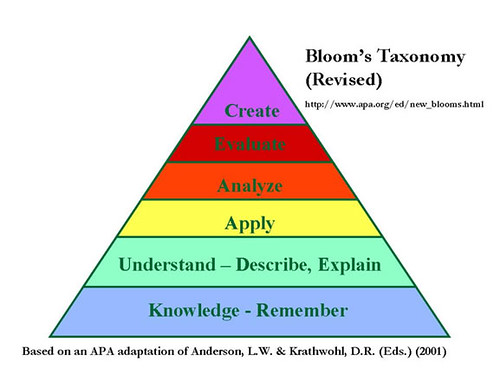
Repeatedly throughout the semester, I was struck by how Web 2.0 supports the higher level of Bloom's taxonomy and higher order thinking skills. This has been conveniently graphed for me on the visualblooms wiki:


There are a bunch of icons here that I'm not familiar with yet, but I definitely agree that at the pinnacle of the pyramid, in the section for Creating, are Voicethreads, Blogs, and Wikis. 

Web 2.0 not only affects engagement levels of students, it also changes how learning is structured and assessed. How will I know when my students have mastered the learning objectives? What format will their learning be demonstrated in? How do I assess their diverse products? And how do I know that this particular student contributed, collaborated, and created original work? Teachers require a different skill set to structure and assess learning in the 2.0 environment. 

To gain this skill set, teachers will need to engage with 2.0 for their own personal learning. Will Richardson wrote very passionately about this on his blog in March 2008. If teachers don't pick up Web 2.0 skills, how can they possible teach students Web 2.0 skills or prepare them for the world they will be graduating into? Today's learners need to know how to learn how to learn, and they need to know how to be responsible netizens. "And that, is what we have to be preparing our kids for, that learning that is going to happen, using these technologies in these mediated spaces or 'networked publics' throughout their lives. It's about self-study, self-direction, independent learning. Right now . . . our biggest challenge is we're not teaching kids to be that type of learner" (Richardson, March 2009).

Web 2.0 is new enough that we don't quite realize the long term implications of our digital footprints. Students have the right to know about data mining, filtering, and copyright laws. As educators we are charged with looking out for the overall well-being of our students, and these 2.0 issues distinctly fall within those parameters. I keep going back to Doug Johnson's words on his 2008 blog: "Schools DO need to teach safety and privacy with all social networking tools. If we don't, who will?"  


Monday, November 30, 2009

Blog #9: Blogs & RSS

Introduction

Setting: An office in a rural community, August 2009.

ME: Maybe we should start a blog.

CO-WORKER: Yeah, but who reads them? And who's going to write it? We're already so busy. What are we going to write about?

ME: I don't even know anyone that reads blogs, do you?

CO-WORKER: No.

ME: So what's the point in writing one? I guess I could find the time to write one or we could share the writing, but why put in all that effort if no one is going to read it?

Reflections on the process of learning about blogging & RSS

Oh silly, silly August me. Before taking this class, I thought RSS stood for the initials of my high school. Little did I know that the acronym stood for something much more powerful. And I thought I didn't read any blogs. And that no one would read my/our blog. And that if no one read the blog, there was no point in writing one. And that I didn't have enough 'to say' to create regular content for a blog.

My pile of wrongs was very high indeed. Having used RSS feeds and Blogger for three months now, I have seen the error of my ways and experienced a profound shift in how I interact with online content and offline experiences. First, I realized I was already reading blogs I just hadn't understood them to be blogs; I thought they were websites my more tech-savvy friends and classmates used to share their travel experiences, school assignments, and creative writing. Apparently, I shouldn't have been so quick to place these friends on a pedestal. As Richardson writes, "a Weblog is an easily created, easily updateable Website that allows an author (or authors) to publish instantly to the Internet from any Internet connection . . . comprised of reflections and conversations that in many cases are updated every day" (Richardson, 17). Looking at my bookmarks, I realized that some favourite news sites were blogs, as were my brain-break sites such as GoFugYourself.

But was blogging really easy? Yes. Considering there are an estimated 120,000 blogs created every day and over 346,000,000 people around the world who read blogs, blogging is an easy tool to incorporate into your personal and professional lives. My only caveat to creating a new blog would be to give yourself plenty of time. Last semester, the day before a massive paper was due, I thought I would set up a blog and post my assignment online so readers could jump between sections and not have to read a linear chunk of text. Bad idea. As you can see here, I got overwhelmed by the new tool, floundered, and abandoned the online paper submission. With the deadline looming, my time was better spent proofreading and editing than messing around with an entirely new website program.

After the stress on WordPress last semester, I decided to give Blogger a try. Also, I noticed that most of my classmates were using Blogger for this course and realized that if I needed a helping hand, there would be more friendly support available for Blogger issues than WordPress ones. Although I liked the look of the WordPress templates, the functional, easy-to-use Blogger seems like you can just put your tires to the road and roll.

Before creating your first post, I recommend spending some time getting to know the back end of Blogger, aka the Dashboard, and thinking about account settings. Will your blog be public and searchable, or reclusively avoiding search engines? Can anyone post a comment at any time, or do you want to be notified and pre-approve comments? I did not notice anyone in our class trying to make a few bucks by allowing advertisements on their blogs, but if you expect high traffic numbers on your blog it might be a way to make some extra income - to buy library books, of course.

Doing the fancy stuff on Blogger wasn't too onerous and I enjoyed spending time sifting through available templates, refining the design of the page, playing with widgets, and inserting multimedia into the text. This fiddly stuff aside, the most interesting part of blogging was the overall shift in how I wrote. In September, I was reading online and making notes on paper. Once I figured out how to save drafts on Blogger, I found myself making notes right in each post. I created posts for the rest of the semester and then every time I found relevant information, I would log in and add content to the drafts. Being a person who uses three or more computers in a day and walks to work, this online writing allowed me to research and write independently from paper, location, or packing around media storage devices.

My notes on RSS feeds from earlier in the semester use words like "guilt pile" and "stress" but I've come to agree with Doug Johnson when he writes that aggregators are "the true unsung hero of Web 2.0." RSS feeds are like newspaper or magazine subscriptions which you can subscribe to for free. Every time there is a new 'issue,' or post, it is automatically sent to your inbox. So instead of checking into your favourite websites on a regular basis to see if there's been anything new posted, you save time by having the freshest material sent to you automatically.

Having all this information sent to your email account would clog up your inbox, so most people use aggregators to collect these subscriptions. I set up an account for Google Reader to manage my subscriptions for this class, and also used my Outlook program at work to manage employment counselling related subscriptions. The features in Google Reader are outstanding - especially how your unread items count down as you scroll through them - and I still feel like we're just getting acquainted.

My initial sentiments were based around numbers and being overwhelmed by the amount of information landing in my Reader inbox. A week off, not reading any feeds, could result in hundreds of new unread items. "This is not surfing the web," I thought, "this is drowning." I found that I would read the blogs with the fewest new posts, or the ones I knew would be short and sweet. This led to me avoiding the longer posts which kept on piling up. What I had to learn at this point was the value of skimming and scanning, or as Lauren Barack suggests, “treat RSS content like a newspaper, not email” (Barack, 2008). After all, I don't walk into a library and feel compelled to read every single book on the shelf, or open a newspaper and read every single column. And for those times when new items were piled sky high, I learned to let the guilt go and declare bankruptcy by marking all content as read, setting my Reader inbox back to zero (Big thanks to Donna Friesen for citing Shirley Kennedy's 2008 article in our first discussion group which recommended this coping strategy).


Once I realized I was in charge of my Reader account, I began to appreciate how I could quickly skim through both personal and professional information, following only those paths which twigged my interest. For posts that I liked and wanted to remember, I could "Add Star" and know that I would be able to find my favourites again later. This feature was great to use in combination with "Add tags" which allows users to tag items, creating their own filing system for posts. To the right is a shot of some of my tags:

Other times, I would run across an article that a friend or family member was interested in. I appreciated being able to directly email them the relevant article from my gmail account with a personalized note. And for those articles that I thought should be shared with the whole world, the "Share" button was like my own little billboard on the information superhighway.

One of the few dimensions I did not like about reading articles in the aggregator was that I missed the personalized 'feel' of each site where the articles came from. To save time, I had been reading classmates' blogs in Reader until I realized that I wasn't being exposed to any of the cool tools they were experimenting with or widgets they were adding. Also, I noticed that reading only one person's articles left me feeling like I was getting information out of context - kind of like getting the New York Times and only reading one columnist. To combat this, I signed up for RSS feeds from the main page of websites, as well as the individual ones I was interested in.

Discussion of blogging & RSS for my own personal learning

On a personal level, I will be maintaining my subscriptions to the following content, as well as keeping my eyes and ears open for others I may want to add.

CBC British Columbia   It sounds nuts, but sometimes I forget about the news. I don't have a TV in my home, and rely on internet news sites for current events. But when life gets busy and my head is down, major world events can elude my radar. Maintaining this subscription reminds me that there is news happening and I may want to check it out in more detail.

Community Skills Centre Job Board   This subscription relates to the web work I do as an Employment Counsellor. I research the local labour market and post jobs to this job board. Maintaining this feed lets me know when something goes wrong. Two weeks ago, our website was attacked by malware (malicious software) and the first indication I had that something was wrong was when the feeds stopped showing up in my Reader.

Community Skills Centre Job Board, Science & Technology   Similar to the main job board, this feed lets me keep tabs on how many of our feed subscribers are tech savvy and using the RSS feed feature. To grab this information, I click on "Trends" on the Home page of Google Reader, and "Most Obscure" under "Subscription Trends." The Trends page is also helpful in helping me assess which blogs I've been reading and which I've been hazing out on as it conveniently graphs how many items I read each day, what percentage of posts I actually read, and how often posts are being delivered.

Easy Street Records   This independent record store in Seattle keeps me updated on the alternative music scene, new music releases, and giveaways. One of my husband's favourites, the content often informs our vacation planning around band tour dates and vinyl record purchases. If I did not have this feed, I would not be keeping tabs on new music.

Free Technology for Teachers   Although this subscription could be included in the next section, I am keeping it under Personal Learning because I find the posts to be interesting no matter what I am currently teaching or not teaching. The posts address a wide range of grade and ability levels. My only wish for this site is that it incorporated more international content as the American context shines through. That said, it is a great resource for teachers teaching ESL overseas needing accessible material for cultural holidays and understandings in American society.

HAUTE*NATURE   Again, this is another site that crosses between personal and professional. It has changed my thinking because I used to believe that to find cool stuff, I had to search for it. Now, cool stuff, "ecologically based creative ideas, art & green products for your children, home and lifestyle . . . blending high style with sustainability," is delivered to me almost daily. My high school woodwork teaching husband uses this site to gather ideas for student projects and teach the potential of reclaimed wood.

The Steampunk Home   Completely self-gratuitous, I just like the pictures from this blog. Sometimes the images inspire my crafting.

TL-DL Blog   Being an online student means not having the same connection to campus and characters that one might when physically attending classes. The TL-DL blog helps to keep me in touch with the happenings in the University of Alberta's Teacher Librarian by Distance Learning program. Although not updated regularly, when information needs to get out, this is one resource that works for me as I always forget to check my U of A email account.

My own blog   All right, all right, I subscribe to my own blog. At first I was kind of shy about this until I was validated by this article by Sue Waters (again, thanks to Donna Friesen for sharing this link in our third discussion group). Waters recommends subscribing to your own feed so "you'll see your posts how they are seen by your subscribers. This allows you to troubleshoot issues with font sizes, image size/alignment and removal of content." This helps my personal learning by showing me where I need to make changes and how my blog 'comes across' to others.

RSS Library   Maybe because much of what I do personally rubs off into my teaching, this is another blog subscription that transcends the boundary between personal and professional. The author of this blog is a former TL-DL classmate and the current librarian in my former high school. I use this feed to keep tabs on what's happening in Rossland, what the librarian perceives the students' needs and interests are, and how she uses the blog to support her library program. And she's just a great person that I want to show my support for.

When this course is over, I will definitely be keeping my Reader account alive for personal uses, as well as to keep current on professional development. But there is more to the blogging world than just reading. The process of blogging over the last three months has shifted my thinking from "something I have to write" to "I could use this in my blog post!" My writing has improved because I am constantly set at hunter-gatherer mode, reading for much more than just comprehension or general knowledge.

The act of writing a blog post is an interesting paradox of writing for no one, and writing for potentially everyone. The hyper-awareness of audience forces you to be acutely conscious of making your writing both accountable and readable. For myself, I am aware that parents, students, friends, family, and potential employers may be stumbling across this site - a much larger audience than those participating in this course alone. Blog readers are able to make comments, tweet my blog, bookmark and link to it in their own postings. All this opportunity to participate opens the doors to audience and discussion even wider.

Having installed Google Analytics onto my blog, I have been able to track the global traffic to my posts. At this time, I've had visitors from four Canadian provinces, three American states, Norway, and the United Kingdom. This data has changed my understanding of writing being a solitary act to one that is participatory. Writing a blog makes you a contributor to the larger dialogue, another voice in the choir where every voice is unique.


Discussion of blogging & RSS in terms of teaching and learning

The wide variety of uses for blogging and RSS in education are mind boggling. While Professional Development and student engagement are the top two reasons for incorporating these tools into teaching practice, some other potential uses I can think of include:

  • Board, union, district, and school-based newsletters. Currently in our district, the Board and union newsletters and meeting minutes are emailed to every staff member and posted on the related website. If these two groups moved to a blog format, the flow of information could become more of a two-way street. Paper copies of school newsletters can often go awry on the path between school and home. For those parents who have blog aggregators, RSS feeds of blogged school newsletters creates an archived, accessible version of information that gets delivered promptly and intact. 
  • District ProD opportunities. A blog of available ProD opportunities divided into applicable categories such as elementary, secondary, math, language arts, and so on, would be an improved way to disseminate the information of what ProD is available. Currently, I receive random emails and see a hodge-podge of dated posters on school bulletin boards. A district ProD blog would organize and archive the opportunities, also allowing for up-to-the-minute venue changes and cancellations. Often, many teachers have the same question about a ProD event and they have to call or email the district ProD coordinator. The commenting function on blogs allows for one person to ask the question and many people to receive the answer, eliminating the need for the district coordinator to respond repeatedly to the same question or send out yet another bulk email.
  • Creating community. Whether for a whole school, classroom, or library, blogs are one way to build community and common culture. 

Some reasons for teachers to write blogs
     Blogs can be used to reflect on teaching practice. Writing a teaching blog helps teachers to think more deeply about their daily experiences and learning activities. In addition, teachers can receive feedback, support, and suggestions from their peers on best practices, gems of advice, and new technologies in the comments section.
     A teacher writing a blog models for students how to write blogs. The teacher can use their blog as a sample for inspiring student works. The ability of the teacher to write a blog post also informs how successful the teacher will be in scaffolding the students' learning in creating their own blogs and posts.
     The classroom blog can not only build community inside the classroom, but also build community outside the classroom. Teachers across the globe can partner their sites, and students would be able to compare and contrast their educational experiences. Or, closer to home, the classroom blog serves as another link for parents to stay connected to what their children do at school.
     As well, a teacher's blog can serve as a springboard to structure assignments. Teachers can place all the required reading and suggested links in one central location, minimizing the amount of time students take to type long URLs into their address bars or Google suggested sites.


Teachers reading blogs
     If teachers have their students create blogs, then it stands to reason that the teachers would be reading these blogs. However, the greatest advantage of teachers reading blogs is for Professional Development. There are thousands of educational blogs which can help teachers support and expand their teaching practice. Some of the ones I followed this semester which changed, challenged, or guided my thinking included posts on:

David Warlick's 2 Cents Worth posed some challenging questions as to how students learn computers, and if this was even a class worth teaching anymore. Doug Johnson's Blue Skunk blog was a veritable fountain of bits and pieces of current happenings in the educational world. The rotating contributors to Copyblogger provided much writing advice and tips for promoting your online content, ones that made me stop and think how I could try them out in my blog and everyday writing. Joyce Valenza's Neverending Search always amazed me: if she can figure out how to cram every day full of so much reading and writing and experimenting and conferencing, not to mention teaching, then I could most certainly find the time to follow her prolific efforts. Valenza was reliably a source for new tech tools and challenging questions around the role of school libraries. Stephen Abram functioned as a personal aggregator on his blog, collecting odds and ends from around the internet and compiling them in his musings.

Students writing blogs
     For all the reasons I experienced as a personal learner using blogs, students would also benefit from. Having a tool that shifts the learner from passive audience to active participant is a powerful one indeed. Kris Kelly connects this shift to Bloom's taxonomy: "One of the major attractions for teachers to use blogging is that its focus is not necessarily on the content of the blog but more on the process of constructing and evaluating knowledge helping us reach the sometimes illusive upper level - analyzing, evaluating, and creating - of Bloom's Taxonomy.


     Not only are students shifting from passive to active engagement, they are contributing to the global dialogue and able to discuss their learning in a larger arena than just their classroom. With the help of resources such as CyberSmart, students can remain safe on the internet while bringing their work to a higher level of accountability. Teachers are developing rubrics for blogging that structure for the success of the learner in the new format.
     "The sequential, chronological characteristics of the blog format suggest how it can be useful in capturing such things as the development of a narrative, the design and implementation of a project, the progress of research, emerging processes, the aggregation of links or references, and observations or reflections that develop over time" (Davies and Merchant, 31).


Students reading blogs
     Students reading blogs helps students to improve their overall literacy and their digital literacy. Students are able to practices valuable skills such as skimming and scanning, dealing with information overload, and establishing reliable sources of information. On a personal level for students, they can read blogs associated with their personal interests. In a small town, this experience can be very validating and reduce feelings of isolation by allowing learners to connect with people who share their interests. In addition, reading blogs positions students to become lifelong learners by establishing their own personal learning network.
     Pageflakes and RSS are two ways students can read blogs. While Pageflakes, the individualized start page, supports lateral and non-linear thinking, too much content can be visually overwhelming and cluttered while taking a long time to load.


Students using RSS feeds to conduct research
     One of the most brilliant uses of RSS feeds is as a personal research assistant. After refining search terms, students can subscribe to a feed of all new results incorporating their keywords and parameters. The RSS research feed provides a constant, updated stream of incoming information, again allowing learners to practice their information management and media evaluation skills. Today's students navigate the information age, where all kinds of information comes to them and they must become information literate. Reading RSS feeds in tools such as Google Reader supports students learning these valuable literacy skills.

Summary (in response to the Introduction)

But who reads them?
I read them. You read them. You're reading one right now. People all over the world read them. People who think, share, care, and are searching are reading them. Maybe not everyone is reading them, but 77% of internet users are reading them.

Who's going to write it (and how)?
I'll write it, you'll write it, we'll take turns writing it, or we'll write it together. It's our blog, we make the rules. It's our blog, there are no rules. The "blog concept is about three things: Frequency, Brevity, and Personality" so let's try and write it regularly to keep our toes to the fire.

What are we going to write about?
What AREN'T we going to write about? You tell me.

Works Cited (not linked in text)

Barack, L. (2008, August). Beating Information Overload. School Library Journal, 54(8), 17. Retrieved September 28, 2009, from ProQuest Education Journals. (Document ID: 1524502001).

Kennedy, S.D.. (2008, November). Dealing With Information Overload: Bring It On. Information Today, 25(10), 17,19.

Monday, November 23, 2009

Blog #8:Twitter

Introduction

Twitter has been the first web 2.0 tool to make me feel like a crotchety old naysayer. Until I watched this clip from Dave Letterman with guest star Kevin Spacey . . .


. . . now that's what a crotchety Twitter naysayer looks like. I feel a little better about myself ;o) Although I haven't found an immediate use for Twitter in my personal life or teaching practise, I have explored the potential of the tool and learned about it enough to understand some of the possible implications for teaching, learning, networking, and marketing.

Reflections on the process of learning about Twitter

I signed up for Twitter at the beginning of the semester as it seemed like one of those tools that would organically grow and evolve over time, similar to my facebook page. Although I was completely unfamiliar with Twitter, I had been hearing about it a lot in the media. My friends and family didn't seem to be using Twitter, but maybe students were? With all the hype, it seemed like a web 2.0 tool that was expanding, worth investigating, and here to stay (well, at least for another year or two).

Account set up was easy, as was sending my first few tweets. Because I started using Twitter before learning about Delicious, I started out by using my Twitter account as a self-serving bookmark dumping ground. This habit was aided by the fact that long URLs were automatically translated into shorter ones by the bit.ly service and some of my favourite websites such as CBC News and YouTube provided AddThis buttons to facilitate easy tweeting. While Twitter was serving this purpose in my life, I posted quality links a couple of time a week. Once I embraced Delicious, my Twitter account lost direction.

I also spent September looking for people to follow. I immediately searched for and began to follow the 14 people recommended in our class notes. On September 7th, I changed my facebook status to "I have to follow 15 people on Twitter for a school assignment - suggestions please!" and of the 190+ people in my network, only two replied. Having had little luck with friends and family, I started looking for the Twitter badge on websites I already frequented. This strategy led me to follow The Tyee, The Onion, and Bust Magazine. Next, I tried searching for present and former classmates and professors, followed them, and had a look to see who those savvy people were following.

One frustration I stumbled across was when a friend would tell me their account name, I would carefully enter their name in the "Find People" Twitter search tool, and the results would return nothing. It seemed like the search tool was only effective for finding users with more than one or two tweets, followers, or people they were following. In other words, 'small' accounts were not returned in the search function. Booh!

I learned about Twellow, the Twitter yellow pages, from Mack Male's Elluminate session. This site not only helped me search for Twitter users by geographic location, it also confirmed what I had been suspecting: people around here just do not use Twitter. After searching for a wide variety of local cities, villages, districts, and regions, the search results returned less than one page of local users, only two of whom are local educators. This miniscule search return could also be explained by the users not setting their location in their profile, usually for privacy and safety reasons, or by the 'small' account symptom I mentioned above. Either way, Twitter at this point in time is not a tool for local networking or information sharing.

All signed up to follow people I was startled, then annoyed, by all the useless tweets showing up in my home page feed. Conversations that meant nothing to me, tweets about needing a muffin or going to bed, random links with no descriptors posted every couple of minutes - sometimes all of these things by the same user! A cacophony of noisy tweets, sounding something like this (only watch as much as you can handle, it doesn't get any better):


Perhaps because Twitter is so new and being used by many people to achieve different things, the netiquette has not yet thoroughly evolved around it. I believe Twitter would be much more effective if users had two accounts, one personal and one professional. I follow users on Twitter for professional development purposes, garnering teaching ideas and resources, not to know what they are watching on TV. On the other hand, I do enjoy the tweets from friends and family as I like to know what they are doing and how their life is going. What I found in my feed, however, is that these tweets from friends and family were drowned out by the general cacophony.

Apparently, other users must have been feeling a similar frustration as Twitter rolled out  a List feature in October that allows you to sort the people you follow into categories. Now that I have done this, my account feels more like a tool and less like a noisy burden.

Discussion of Twitter for my own personal learning

Twitter has been a good tool to explore in the last couple of months as it has reinforced the idea that just because a web 2.0 tool is free, somewhat popular, and easy to use, doesn't mean that it will fit into my life or respond to any vacant need. While I initially enjoyed the idea of mini shout-outs, it did not necessarily follow that anyone was listening. What was the point of posting content when the tweet was swallowed by the nether? The feeling was similar to a lonely person shouting at the skies not sure if anyone wanted to listen, like a solitary figure in Hyde Park's Speakers' Corner.


The concept of a status update to share with friends and family was already being filled by my facebook account. How else could I use Twitter in my personal life? To keep up with celebrities, I checked out the list of top Twitterers at Twitterholic and stumbled onto the account of Yoko Ono. As a multimedia artist, she uses her Twitter account to not only send out updates about her band and many projects, but to tweet small poems and words of wisdom.

After figuring out what twooshes and hashtags were, I started thinking about how the limitation of 140 characters could actually give rise to a new kind of poetry, similar to the haiku. Out of curiosity I typed '#haiku' in the search bar of my home page and found hundreds of users were already using Twitter to post original haikus. Next time I need some random, poetic uplifting, I can quickly search for Twitter haikus. Twitter + haiku = Twaiku?

Having played with Twitter for two months, I brought the idea of an account to the marketing team at the non-profit agency I currently work at. They were receptive to the idea, especially seeing as how few local users there are at this point in time. The virtual anonymity combined with the cost (free!) and time commitment (very low!) were attractive enough that I got the green light to create and maintain our account. Still in progress is getting our full logo small enough to upload as the profile picture, having a badge on our main website, and stretching the background image to fill the entire page of the profile. To keep the account current and vibrant, we have resolved to tweet once every business day or two. This practise will have us well-positioned if and when Twitter takes off in the local area.  

The process of building this professional Twitter account was very different from my personal one. I was much more selective in choosing who our organization would follow and conscious of maintaining our reputation. Also, the account 'Notices' settings are different. On my personal account, I have all notices turned off while the professional one has 'New Follower' and 'Direct Text Emails' turned on so that we can keep close tabs on account activity.

Discussion of Twitter in terms of teaching and learning


Laura Walker, a Director of E-Learning at a UK school, has given the following "Nine great reasons why teachers should use Twitter":
   1. Together we're better
   2. Global or local: you choose
   3. Self-awareness and reflective practice
   4. Ideas workshop and sounding board
   5. Newsroom and innovation showcase
   6. Professional development and critical friends (see also Kenney, 2009)
   7. Quality-assured searching
   8. Communicate, communicate, communicate
   9. Getting with the times has never been so easy!


The most obvious use of Twitter for teachers is as a quick and dirty Professional Development (ProD) tool. By following only a handful of well-chosen edu-tweeters, teachers can access an evaluated stream of links, information, and discourse in bite-sized pieces. "Following other educators on Twitter creates a 'network at my fingertips' phenomenon where people ask questions and get answers, link to great blog posts or resources, or share ideas for projects" (Richardson, 86). Because tweets are limited to a 140 characters, even very busy people are able to contribute. My top choice for teacher-librarians would be Joyce Valenza as she is constantly evaluating and implementing web 2.0 tools, providing a variety of links and comments that point you in a new or great direction.

However, finding gems such as Valenza is challenging in an environment where 80% of users are primarily navel-gazing (Rutgers University study on Mashable). One place to start in seeking out other educators that share similar subjects and content areas is on the Twitter4Teachers wiki. Here, educators can post their Twitter username under their specific field and browse a list of educators working or interested in the same field to possibly follow.

I agree with Richardson when he writes that "Twitter is a bit too Wild West for most school situations" (Richardson, 87). This hasn't prevented some teachers from embracing Twitter and finding creative uses in their classrooms and beyond. In the following video, biology teacher Paul Andersen discusses the basics of Twitter, as well as how he used Twitter to create a learning network for one of his classes (the good stuff starts around run time 3:30/9:51).


What's interesting in Andersen's discussion is that his students all seem to have cell phones and receive his class tweets as instant messages. In my rural area where cell phone coverage is often interrupted by mountain passes, many students do not have cell phones. Also, even if they did have cell phones, parents would be outraged that the teacher expected them to receive instant messages, a service that costs money.

It seems that in order to be effective, Twitter requires the teachers and students to have constant internet access. On his eLearning blog, David Hopkins encourages educators to enhance their classroom experience by "letting your students online with laptops and other devices when they're in your classroom. Use a hashtag and ask your students to use it on each tweet; this means you can easily collate tweets together at the end of the alloted task/activity/time." This reminded me of Michael Wesch's video, "A Vision of Students Today" in which students reported that they facebook through most of their classes and they bring their laptop to class but they aren't working on class stuff.  

"With scant research on the efficacy of social-networking tools such as Twitter, and few clear insights into the best (and worst) uses for them, there is little agreement among researchers and educators about how or whether Twitter-like technologies could or should be used in schools" (Manzo, 2009).

Summary

I gave Twitter a fair shot over two months and did not feel that I was getting much value back for time invested. In the future, if more local people and students start to use Twitter, then the site might become useful on a personal level. For now, I am aware of the site, have read massive amounts of writing and literature about Twitter, and am comfortable with using my account  for a variety of purposes. Maybe, as Marcia Conner suggests, I will grow to love Twitter over a more extended period of time since people "across the globe; - people smarter and busier than you - use Twitter" (2009). And they must be onto something good, right?

Works Cited (not linked in text)

Conner, M.. (2009, August). Twitter 101: Are you tweeting? T + D, 63(8), 24-25, 27. Retrieved November 22, 2009, from ProQuest Education Journals. (Document ID: 1833987711).

Kenney, Brian. (2009, November). With a little help from our friends. School Library Journal, 55(11), 9. Retrieved November 22, 2009, from ProQuest Education Journals. (Document ID: 1891472341).

Manzo, K.K.. (2009, October). Twitter lessons in 140 characters or less. Education Week, 29(8), 1, 14. Retrieved November 22, 2009 from ProQuest Education Journals. (Document ID: 1891350041).